From a 4-Hour KNIME Workflow to a 30-Minute Tiny Tool
Background
Every month, a batch of bank account statements arrives as PDFs — one file per account, per period. Each PDF contains a transaction table, and the real work only starts after extraction: rows from every file need to be pulled out and combined into a single Excel file for reconciliation and reporting.
Doing this by hand in Excel is slow and error-prone: copy-pasting tables out of PDFs breaks formatting, misaligns columns, and turns transaction amounts and dates into text instead of usable numbers. It’s exactly the kind of repetitive, mechanical task that should be automated — but building that automation has its own cost.
My previous solution was a KNIME workflow with embedded Python nodes for the PDF parsing and data-shaping steps. It worked, but it took about 4 hours to build, and it lived entirely inside my KNIME installation and my Python environment. No one else on the team could run it — it wasn’t a tool, it was a personal script wrapped in a workflow engine only I had configured.
What I Built
Working with Claude, I built a small standalone desktop application instead: a Python GUI tool that opens with a folder picker, scans every PDF in the selected folder, extracts the transaction table from each one, aligns and type-corrects the combined columns (dates, amounts, currencies), and writes a single clean Excel file — with a progress bar and log so the user can see what’s happening.
Total build time: about 30 minutes, including working through a few edge cases in the extraction logic (inconsistent table borders across statements, ambiguous date formats, thousands-separator handling in amounts).
The result is a real application, not a script:
- A double-clickable shortcut — no environment setup, no KNIME, no “run this node.”
- A visible progress bar and log instead of a silent batch job.
- A save dialog to choose where the combined Excel file goes.
- Clear, human-readable errors when a PDF doesn’t match the expected table shape, instead of a cryptic workflow failure.
Outcome
The immediate win is obvious: a task that used to take 4 hours to automate now takes 30 minutes, and the resulting tool is better — more robust, more transparent about what it’s doing, and friendlier to someone who isn’t the person who built it.
The bigger win is who can use it. The KNIME version was a one-person tool by construction — it depended on my machine, my node configuration, my mental model of the workflow. The new tool is self-contained and shareable: any teammate can double-click the shortcut, pick a folder, and get their Excel file, with no knowledge of Python, KNIME, or the underlying extraction logic required.
That’s the real shift this project demonstrates: it’s not just “AI made me faster at writing code.” It’s that a task which used to require a specialist to build and a specialist to operate can now be turned into genuine self-service tooling — built faster, and usable by everyone, not just its author.
Stack Rationale
The tool is deliberately built on a narrow, pure-Python stack:
- pdfplumber for PDF table extraction — reliable table/text detection without relying on compiled PDF-rendering libraries.
- openpyxl for writing the final Excel file, including number formatting for dates and currency amounts.
- python-dateutil for parsing the mix of date formats found across statements.
- Tkinter for the GUI — ships with Python, needs no separate install, and is enough for a folder picker, progress bar, and log window.
Notably absent: pandas and numpy. The column alignment and type coercion are done in plain Python instead. This turned out to be a feature, not a limitation — it kept the dependency footprint minimal, which is exactly what makes the tool trivially shareable: any teammate’s machine can run it without needing a heavier data-science environment installed first.
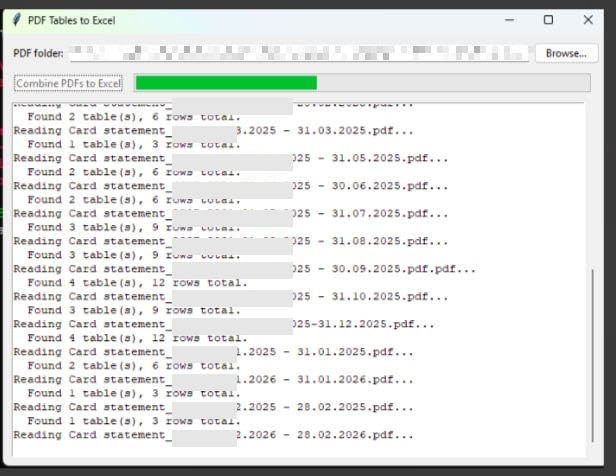
The tool mid-run: folder picker, progress bar, and a live log of each statement being parsed. Click to enlarge.